Webhooks push real-time notifications to your server when things happen in cStar. A new ticket, a customer update, a boss defeat. No polling required.
Why Webhooks?
- Sync with your CRM when customers are created
- Post to Slack when high-priority tickets arrive
- Feed a data warehouse with ticket resolution metrics
- Trigger workflows in Zapier, Make, or n8n
How It Works
- Register a webhook URL in cStar and pick which events to subscribe to.
- When a matching event happens, cStar sends an HTTP POST to your URL.
- Your server processes the payload and returns
200 OK.
That's the whole loop.
Setting Up a Webhook
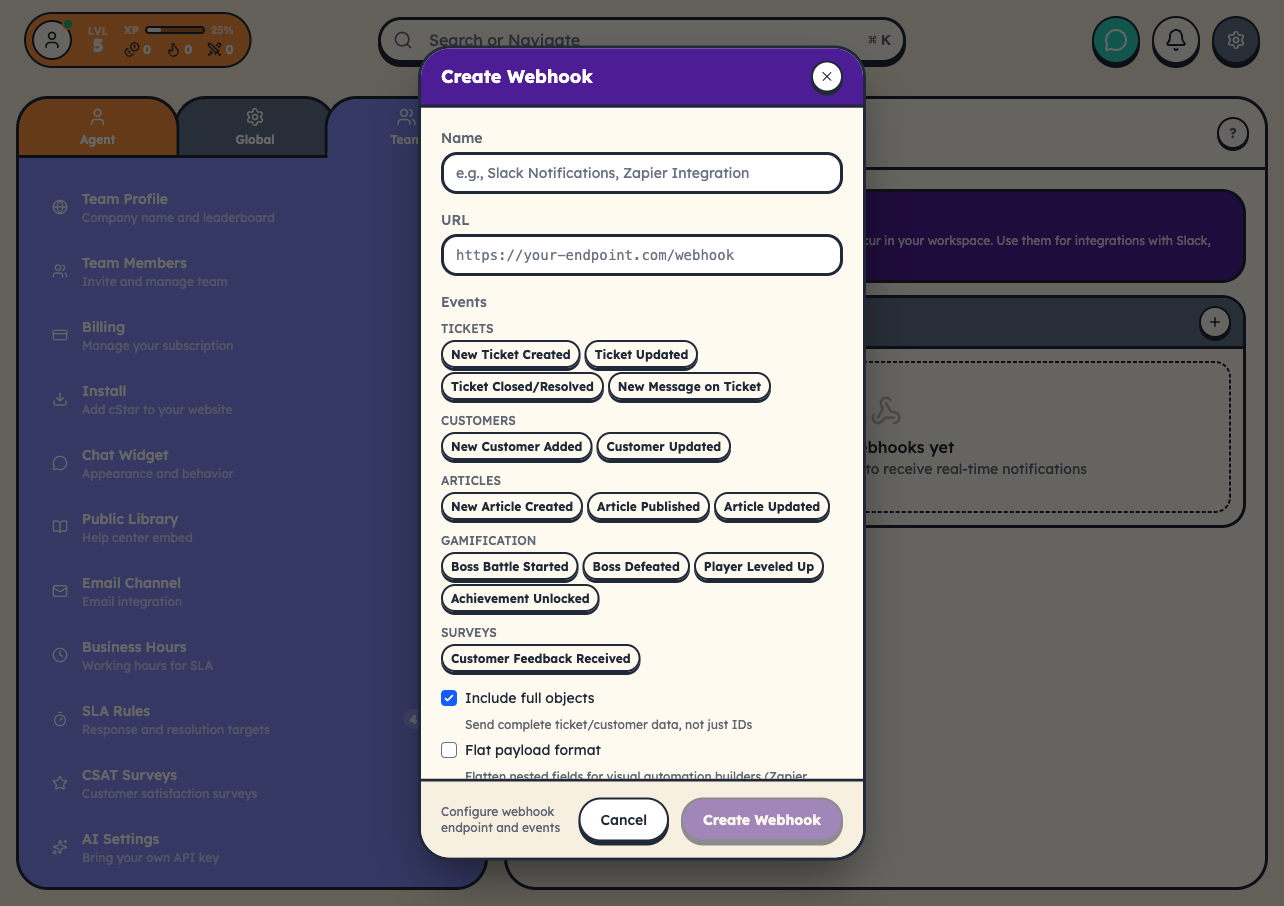
Go to Settings → Team → Webhooks and click Create Webhook.
You'll configure:
- URL: your HTTPS endpoint (must be publicly accessible)
- Events: which event types to subscribe to
- Name: a label for your reference
- Flat Payload: optional. Duplicates key fields at the root level for automation builders like Zapier.
After saving, copy the signing secret. You'll need it to verify that incoming payloads actually came from cStar.
Payload Structure
Every delivery is a JSON POST. Field names are snake_case throughout:
{
  "id": "evt_ticket_created_a1B2c3D4",
  "type": "ticket.created",
  "created_at": "2026-03-30T10:30:00Z",
  "team_id": "ffce2c0d-a0c8-4285-a55f-c674f191feb0",
  "data": {
    "ticket": {
      "id": "tkt_a1B2c3D4e5F6",
      "prefixed_id": "CST-1024",
      "title": "Cannot reset password",
      "status": "new",
      "priority": "normal",
      "channel": "widget",
      "customer_id": "cus_01H8X9YZ7E0J3K4M5N6Q",
      "created_at": "2026-04-27T18:42:11.000Z"
    },
    "customer": {
      "id": "cus_01H8X9YZ7E0J3K4M5N6Q",
      "name": "Casey Patel",
      "email": "casey@example.com"
    }
  }
}
The top-level id is an idempotency key. If you receive the same id twice, that's a redelivery, not a new event.
Request Headers
Every delivery includes:
Content-Type: application/json
X-Webhook-ID: whk_abc123
X-Event-Type: ticket.created
X-Event-ID: evt_ticket_created_a1B2c3D4
X-Timestamp: 2026-03-30T10:30:00Z
X-Signature: t=1711800000,v1=d7a8fbb307d7809469ca9abcb0082e4f...
X-Delivery-Attempt: 1
User-Agent: cStar-Webhooks/1.0
X-Signature is a Stripe-style HMAC-SHA256 of ${t}.${rawBody}. The timestamp embedded in the signature gives you replay protection out of the box (5-minute tolerance window). See Webhook Security for the verification code.
Older deliveries used X-Signature: sha256=<hex> (HMAC over the raw body alone). The cStar verifier still accepts that format so existing subscriber code keeps working.
Responding to Webhooks
Your endpoint should:
- Return 200 OK within 10 seconds (the delivery timeout).
- Process heavy work asynchronously. Return 200 first, then do the work.
- Be idempotent. Same event may arrive more than once.
Retries
Failed deliveries are retried automatically. 6 attempts, exponential backoff:
| Attempt | Delay after previous failure |
|---|---|
| 1 | (initial delivery) |
| 2 | 30 seconds |
| 3 | 2 minutes |
| 4 | 10 minutes |
| 5 | 1 hour |
| 6 | 6 hours |
| 7 | 24 hours |
Anything other than a 2xx counts as a failure. Network errors and timeouts count too.
After repeated failures, cStar may auto-disable the webhook. The Webhooks settings page shows status and recent failures so you can see exactly what's happening.
Testing
Use the Test button in webhook settings to send a sample event to your URL. No need to wait for a real event to fire.
Automation Platforms
cStar webhooks work with:
- Zapier: REST Hooks protocol or catch webhooks
- Make (Integromat): Webhook module
- n8n: Webhook trigger node
For Zapier specifically, cStar provides REST Hooks subscribe/unsubscribe endpoints and sample payloads for trigger setup.
Keep Reading
- Webhook Events Reference: all 35 event types across 7 categories
- Webhook Security: signature verification code
- Webhook Troubleshooting: common issues and fixes